

TCSL NEXT STEPS

THE NEXT STEPS TO COMPLETE FOR TEXAS CLUB SOCCER LEAGUE FALL 2026:
- Registration Verification – Immediately after registering
- Conflict Request Form – Required before team can be approved
- Team Roster – After team approval
- Full League Payment – Due August 21
- Game Day Procedures – Every Game
1
REGISTRATION VERIFICATION
- Log into GotSport and verify that you have signed up for the correct division.
- Make sure to note the format, and ensure that you are signing up for the correct age division.
- Teams can play up 2 years above their age, and teams CANNOT PLAY DOWN. (EX: a U8 team can only play in U8, U9, or U10 divisions)
- Boys teams MAY NOT play in Girls divisions, but Girls teams may play in Boys divisions.
- After scheduling has begun, changing divisions or formats will not be permitted.
If your team is not in the correct division, please notify our League Director, Nicole James
2
CONFLICT REQUEST FORM (CRF)
REQURED BEFORE TEAM CAN BE APPROVED
- All CRFs must be submitted before your team can be approved for the league.
- If you submit a CRF and later need to make changes, please email Nicole James and list any changes you need to make instead of submitting another form.
- You MUST HAVE at least 6 days available.
3
TEAM ROSTER
US CLUB SOCCER SANCTIONED
- Add PRIMARY Coach and Manager to the Team’s League Roster
- All coaches and managers must have an approved US Club Soccer background screening and SafeSport certification for the current soccer year.
- A Primary Coach must be listed on the league roster. The TCSL League Director will not accommodate scheduling conflicts if no Primary Coach is designated.
- Only adults listed on the official game report may be on the player/coach side of the field.
- A maximum of two (2) adults are allowed on the player’s sideline during matches.
- Add US Club Soccer Registered Players to the Team Roster
- Players must be registered with US Club Soccer for the Fall 2026/Spring 2027 season.
- Each player must have:
- A headshot photo (shoulders and above)
- A jersey number
- Do not create new GotSport profiles for registered players. Use the existing GotSport account they used during registration with their club.
Important: TCSL accepts only US Club Soccer registrations. Players registered through US Youth Soccer (e.g., NTSSA) are not eligible to participate.
- Athlete One US Club Passcards
- TCSL will accept US Club Soccer Registration/Passcards purchased through Athlete One. If your team has purchased US Club cards through Athlete One, please upload the US Club roster and passcards to the ‘Registrations’ tab in your GotSport team account under the TCSL League event for verification by the league.
- US Club Soccer Player Registration Notes
- Parents must register players through a US Club Soccer–affiliated club or academy.
- If players are also playing recreational soccer, they must still be registered separately with US Club Soccer to participate in TCSL.
- All documentation must be uploaded through GotSport. Paper registrations are not accepted under US Club Soccer rules.
- Verification and Approval
- Once players, coaches, and managers are added to the roster, TCSL Admins will review and approve each team member.
- Approved individuals will be marked with a green check mark on the GotSport league roster.
- Players may be added at any point during the season; however:
Roster Deadline: Players must be added and approved by 12:00 PM on the Friday before weekend games.
How to Add Players and Coaches to the TCSL League Roster in GotSport
1. Adding a Player to the Roster
– Go to Team Management in GotSport and select your team.
– Click on the “Rosters” tab.
– In the “Select Event Roster” dropdown, choose: Texas Club Soccer League – 2025-26 US Club Soccer Registration/Passcards & Rosters
– Click “Add Player.”
– Enter:
- First Name
- Last Name
- Date of Birth (DOB)
– Click “Search,” then click “Add” when the correct player appears.
– Wait for league approval to finalize roster placement.
2. Adding a Coach/Manager to the Roster
– Go to Team Management and click your team’s name.
– Click on the “Rosters” tab.
– In the “Select Event Roster” dropdown, choose: Texas Club Soccer League – 2025-26 US Club Soccer Registration/Passcards & Rosters
– Click “Add Coach.”
– Enter:
- First Name
- Last Name
- GotSport Email Address
– Click “Search,” select the correct role, and click “Add.”
– The coach or manager will be approved once:
- US Club Soccer background check is completed
- SafeSport training is current and verified
For any roster-related questions or assistance, please leave a ‘Notification’ on your team account in the league event.
If urgent, please email the following:
- Saturday/Sunday Academy Rosters: Tim Garcia – tgarcia@texasclubsoccer.com
- Select/Premier Rosters: Tiffanie Jackson – tjackson@texasclubsoccer.com
4
FULL TEAM PAYMENT
DUE BY FRIDAY, AUGUST 21
- All Team Payments must be completed by Friday, August 21, 2026. NO EXCEPTIONS!
- The expected team payment amounts are as follows (unless otherwise notified by the League Director):
- 4v4 Teams: $575
- 7v7 Teams: $850
- 9v9 Teams: $1,100
- U12 Teams: $1,200
- U13-U19 Teams: $3,300
- Failure to complete team payments by the deadline may result in a $50 late fee or the removal of games from the schedule.
- The multi-team discount will be applied once league registration closes.
To Update Payment Information for an Event as a Coach or Manager:
Step 1: Log in to your GotSport account, click on the “Team Management” tab, and go to “Team Registrations.”
Step 2: Select the “Event” that your team is registered for.
Step 3: Click on the “Billing” tab within the application, then click “Change Payment Method.”
Step 4: Enter your new credit card details and click “Change Payment Method.”
TCSL Accounting will then process the league fee payment.
5
GAME DAY PROCEDURES
- Player Eligibility:
Only approved and registered US Club soccer players are allowed to participate in each match. - Referee Fees:
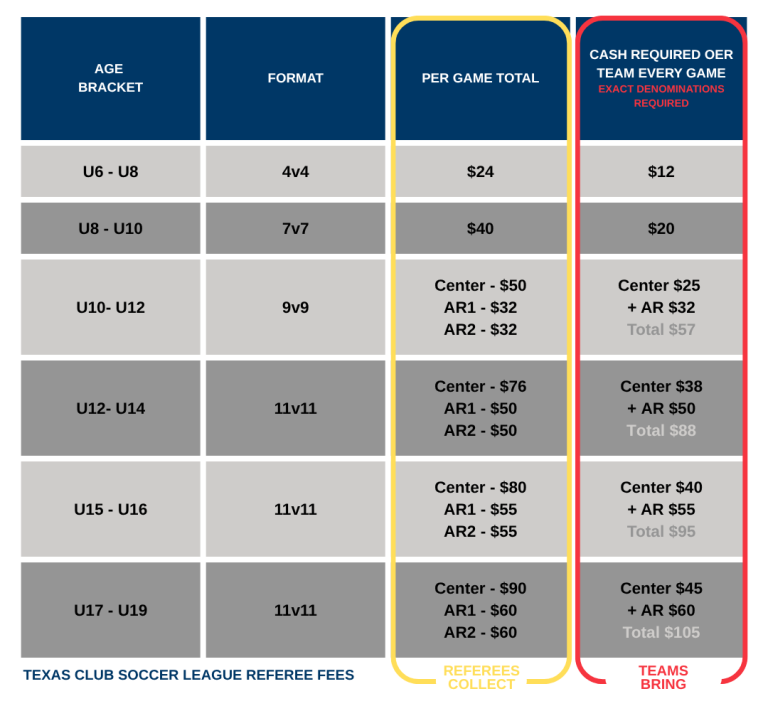
Teams must bring the exact amount of cash required for the referees for each game. Please refer to the red column in the chart below for the specific amount needed.- Game Report:
Each team must provide a game report for every match.This report must include:
– Each player’s name
– Jersey number
– A headshot photo of each player participating in the match
- Game Report:
Important: All teams must present a photo of each player on the game report. Handwritten player details or jersey numbers will not be accepted – no exceptions!
- Athlete One US Club Match Card & ROSTER
- Your match card contains your game information at the top, along with a QR code to enter scores. You will need to present both the printed match card and your OFFICIAL USCS roster to the referee during team check-in. There is no need to use your passcards.
- Coaching Staff:
Any coach or team manager sitting on the coach/player side of the field must be listed on the game report. A maximum of two (2) adults is allowed on the players’ side of the field. - Score Verification:
Referees will return all game reports along with the match scores to the teams. It is the team’s responsibility to verify that the scores are correctly recorded on the match card BEFORE leaving the pitch. Once the scores are confirmed, the winning team should utilize the QR code at the top of the match card to enter the scores. All necessary information for entering scores is included on the match cards. If an incorrect score is entered, please contact:- Saturday/Sunday Academy Rosters: Tim Garcia – tgarcia@texasclubsoccer.com
- Select/Premier Rosters: Tiffanie Jackson – tjackson@texasclubsoccer.com
Teams must retain the match card for the entire season in case of disputes.
Please note that the QR code will expire after 48 hours.
- Card Issuance:
If a card is issued during the match, the referee will keep the game report. All cards are recorded and tracked for every game played.
- Card Issuance:
How to Print a Photo Match Card
To print your team roster with photos, follow these steps:
Step 1: From your Dashboard, select “Team Management.”
Step 2: On the left, select “Matches.”
Step 3: On the right, click the “Three Dots” and select “Print Match Card.”
Step 4: When the window appears, select “Photo.” This will display your team roster with photos.